Gestures and Signs Illustrations Set: The Ultimate Visual Toolkit
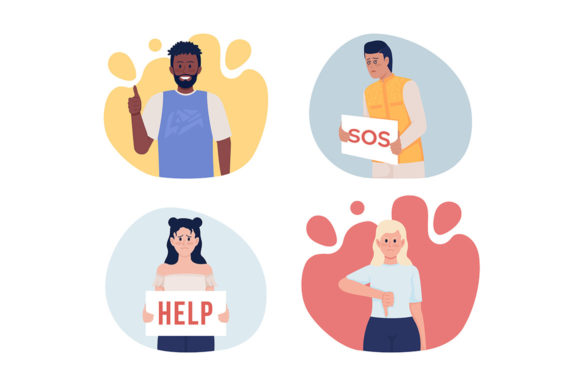
In the fast-paced world of digital design, static text often falls short. To truly connect with an audience ranging from Gen Z gamers to seasoned entrepreneurs, you need a visual language that speaks louder than words. This is exactly where the Gestures and Signs Illustrations Set comes into play. It isn't just a collection of images; it is a comprehensive library of 2D vector isolated illustrations designed to humanize your digital footprint. Featuring a diverse cast of emotions flat characters set against colorful scenes, this collection bridges the gap between complex emotional cues and clean, modern design.
Visual Style and The Power of Flat Design
When we talk about modern UI and branding, the "flat design" aesthetic remains king, but it has evolved. It is no longer about stark minimalism; it is about personality. The Gestures and Signs Illustrations Set embodies this evolution. The style is characterized by clean lines, lack of drop shadows (keeping files lightweight for mobile), and a vibrant color palette that pops on any screen. The characters are stylized to be relatable yet abstract enough to represent a wide demographic. They possess a playful, approachable personality that feels professional without being corporate and stuffy.
A critical technical aspect of this set is the typography integration. The creators utilized Bebas Neue and Quicksand for any accompanying text elements within the designs. For the uninitiated, Bebas Neue is a tall, commanding sans serif font often used for headers, while Quicksand is a rounded, geometric typeface that offers excellent readability. This combination ensures that the illustrations fit seamlessly into projects requiring modern typography. Whether you are working on a mobile app, a website, or a high-stakes presentation, the visual weight is balanced perfectly.
Real-World Applications for Designers and Entrepreneurs
Understanding the aesthetic is one thing; applying it is another. The utility of the Gestures and Signs Illustrations Set spans across nearly every vertical of the creative industry. Here is how different professionals can leverage this asset:
- Web and App Designers: Use the illustrations for "empty states" (e.g., "No results found"), onboarding tutorials, or 404 error pages. The emotions flat characters can guide users through the interface without overwhelming them.
- Marketers and Social Media Managers: Social media graphics thrive on engagement. These vectors are perfect for Instagram Stories, LinkedIn banners, or explainer videos. They add a layer of storytelling to a campaign that stock photography often fails to achieve.
- Content Creators and Bloggers: Break up long blocks of text with relevant illustrations. If you are writing a post about "frustration in business," using a character from the set expressing that emotion instantly makes the content more digestible.
- Small Business Owners: You don't need a massive budget to look professional. Use these assets for packaging design, ready-made banners, or internal training materials to build a consistent brand identity.
Technical Flexibility: File Formats and Integration
One of the biggest headaches in design is file compatibility. The Gestures and Signs Illustrations Set eliminates this friction by offering a robust suite of formats: EPS, SVG, PNG, JPEG, and AI.
Why does this matter? If you are a crafter using a Cricut machine, the SVG files allow for infinite scaling without quality loss. If you are a developer building a lightweight website, optimized PNGs with transparent backgrounds are ready to drop into your code. For print designers working on brochures or packaging design, the AI and EPS vectors ensure that your colors remain crisp at any resolution. This versatility makes the set a true premium font and asset package—meaning it is a commercial-grade tool built for professional production environments.
Strategic Implementation and Brand Consistency
Using an illustrations set effectively requires more than just drag-and-drop. To maximize the impact on your brand identity, consider these practical strategies:
- Color Palette Customization: While the set comes with a colorful default palette, you should tweak the colors to match your brand’s hex codes. Because these are vectors, changing the hue of a shirt or background takes seconds in Adobe Illustrator.
- Visual Hierarchy: Use the gestures to direct the user's eye. A character pointing towards a "Sign Up" button is a classic but effective technique to boost conversion rates.
- Consistency in Style: Avoid mixing these flat characters with 3D renders or realistic photography in the same layout. The stylistic clash can confuse the viewer. Stick to the flat aesthetic for a cohesive look.
For those looking to expand their library, the source material is invaluable. You can find more at our shop: vector characters for your projects, backgrounds for animations, ready-made banners! Having a consistent style across all your assets builds trust with your audience.
Final Thoughts on Visual Communication
In a crowded digital landscape, the ability to convey emotion quickly is a competitive advantage. The Gestures and Signs Illustrations Set provides the tools to do just that. It is not merely about decoration; it is about communication. By integrating these high-quality design assets into your workflow, you elevate the user experience, making your content more engaging, relatable, and professional.
If you are ready to upgrade your toolkit and stay ahead of design trends, keep an eye on future releases. Subscribe on NTL studio to be updated about new illustrations and discounts. Whether you are refreshing a corporate website or launching a personal passion project, these illustrations are the bridge between your message and your audience's emotions.